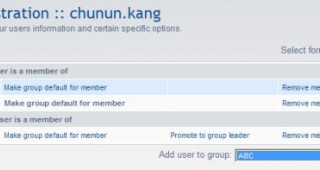
| Hey there, fellow bloggers! Today, let's dive into the world of phpBB and learn how to add groups to registered users. Whether you're managing a small community forum or a bustling online community, understanding this process is essential for keeping your members organized and engaged. So, you want to add groups to your registered users in phpBB? Well, you're in luck because I've got the step-by-step guide to help you do just that. But before we dive in, there's one important thing to note: you'll need administrator permissions to perform this task. Now that we've got that out of the way, let's get started. Here's the procedure: - Log in to your phpBB administrator control panel.
- Navigate to the "Users and Groups" tab.
- Select "Manage Users" from the dropdown menu.
- In the "Select form" dropdown, choose "Groups."
- Now, it's time to select the group you want to add users to. You can do this by checking the box next to each group's name.
- Once you've selected the desired groups, click the "Submit" button.
- Repeat steps 5 and 6 for each group you want to add users to.
And there you have it – a simple yet effective way to add groups to registered users in phpBB. By organizing your members into groups, you can streamline communication, assign permissions, and create a more cohesive community atmosphere. Whether you're creating special interest groups, organizing events, or implementing user roles, phpBB's group management feature has got you covered. So go ahead, give it a try, and watch your online community thrive! 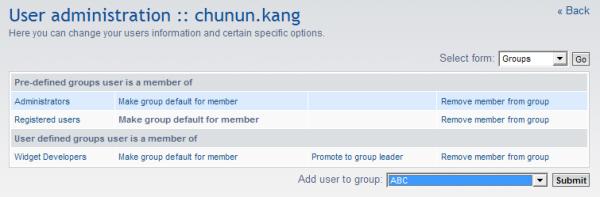
|