Pre-Departure Google Workspace Personal Data Cleanup
CK 3422 Created at Updated at
3,18300
1. Initial Preparation & Policy Alignment
Before performing any data management or cleanup on company-owned assets, establish a clear boundary between personal privacy and corporate compliance.
Understand Company Policy
Review IT & Data Retention Policies: Consult your company's Acceptable Use Policy (AUP), employee handbook, or IT department regarding data retention, intellectual property, and device usage.
Acknowledge Legal Ownership: Be aware that all data created, sent, or received on company-managed devices and accounts is legally owned by the company.
Comply with Data Loss Prevention (DLP): Ensure that cleaning up personal data does not inadvertently delete company files required for business continuity or legal hold, as doing so may violate employment agreements.
Identify and Differentiate Your Accounts
Corporate Account:your.name@yourcompany.com (Managed via Google Workspace, subject to IT administrator control, monitoring, and archiving).
Personal Account:your.name@gmail.com (Managed entirely by you, governed by personal privacy settings).
Isolation Imperative: Never mix credentials, save personal passwords inside a corporate Chrome profile, or link personal recovery options to corporate systems.
Backup Personal Data Strictly (No Corporate IP)
Selective Extraction: If you accidentally stored personal files (such as personal tax forms, family photos, or non-work documents) on a corporate device, move only those items to personal cloud storage or an external drive.
Prohibition on Proprietary Data: Transferring company intellectual property, customer lists, codebases, internal documentation, or proprietary strategies to a personal account or device is illegal in many jurisdictions and violates corporate NDA policies.
2. Managing Your Corporate Google Workspace Account
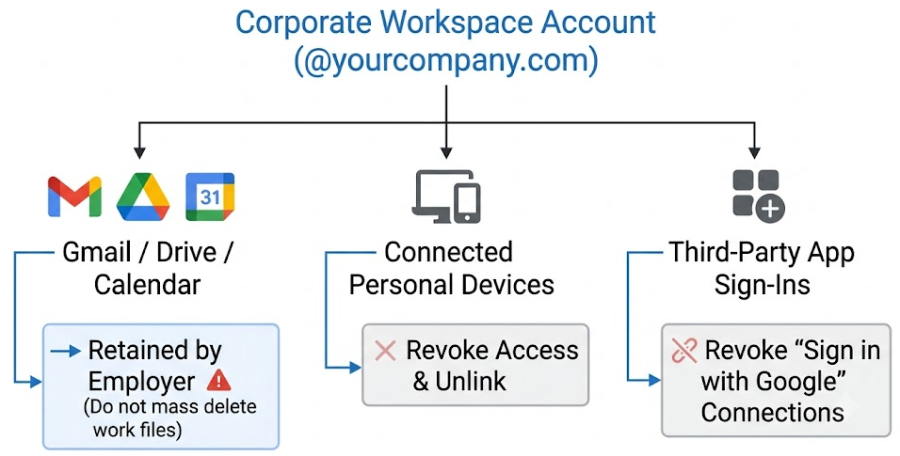
Your company-managed Google Workspace account belongs to the organization. While you cannot delete the account itself, you must ensure your personal footprint is disconnected from it.
Acknowledge Employer Administrative Control
Corporate IT administrators have access to Google Vault, administrative overrides, and activity logs.
Deleting files inside a company Workspace account does not permanently remove them if retention policies or legal holds are active on the administrative backend.
Remove Personal Links and Syncs
Go to your Company Google Account Settings (myaccount.google.com while logged into your work account).
Verify that no personal phone numbers or personal recovery email addresses are listed under the Security tab. Replace them with work-appropriate alternatives if permitted, or notify IT.
Review and Clean Up Drive Files
Search Google Drive for personal keywords (e.g., "resume," "tax," "medical," "receipt").
Move personal files to your personal storage, then delete the originals from the work Drive and empty the Drive Trash.
Note: Avoid mass-deleting actual work files, as this disrupts team operations and can trigger IT security alerts for malicious insider activity.
Revoke Third-Party App Authorizations
Navigate to Security > Apps with access to your account.
Review all third-party services signed into using your work Google identity. Revoke access to any personal apps, external non-work tools, or personal accounts linked via Single Sign-On (SSO).
3. Securing & Isolating Your Personal Google Account
Because browser sync features can cross-pollinate data between work and personal profiles, securing your personal Google account is the most critical step to protecting your passwords and personal history.
Remote Sign-Out from Corporate Hardware
Open a browser and navigate to your personal account's security page: myaccount.google.com/security.
Scroll to Your devices and select Manage all devices.
Identify all company-owned laptops, desktops, phones, or tablets.
Click on each company device and select Sign out to revoke active sessions immediately.
Audit Third-Party App Permissions
Navigate to myaccount.google.com/permissions.
Review the list of third-party apps and services connected to your personal account.
Remove permissions for any work-related tools (e.g., corporate Slack, work Jira, office Wi-Fi provisioning apps) that were authorized using your personal Google account.
Reset Chrome Sync (Crucial Step for Password Protection)
If you ever logged into your personal Google account on a corporate Chrome browser, your personal saved passwords, autofill data, and bookmarks may be stored on that local machine or accessible to IT management extensions. Clearing cloud sync forces a clean break.
Navigate to myaccount.google.com/data-and-privacy.
Scroll to Data from apps and services you use.
Locate Synced from Chrome and select Review synced data.
Click Clear data (or Stop Sync). This deletes synced data from Google's servers and stops synchronization across all active devices without deleting data stored locally on your verified personal devices.
Once cleared, re-enable Chrome Sync only on your personal devices.
Credential Hardening & Account Access Recovery
Change Your Password: Change your personal Google account password immediately after signing out of company devices.
Verify Two-Factor Authentication (2FA):
Ensure 2FA is set to On.
Confirm that verification methods rely exclusively on personal assets (e.g., personal phone number, Google Authenticator app on personal phone, or physical security keys like YubiKeys).
Remove any hardware keys or phone numbers provided by the employer.
4. Chrome Browser Management
Browser profile management determines whether your credentials remain stored on your physical work machine after you hand it in.
Profile Isolation Standards
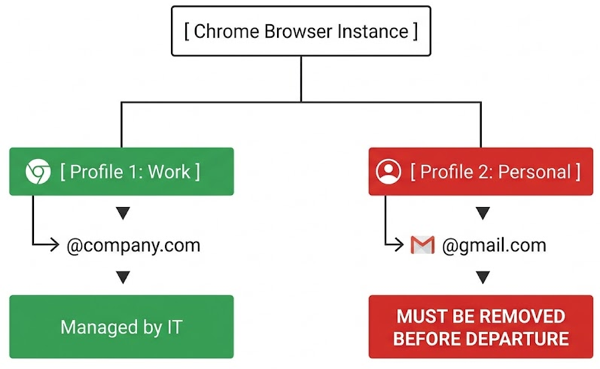
Always maintain complete separation between work and personal browser profiles. Never log into your personal Google account within the primary browser profile of a corporate machine.
Steps on Company-Issued Devices
STEP 1. Delete Personal Chrome Profiles
Open Chrome on the company device.
Click your profile icon in the top-right corner.
Click the Gear icon (Manage Profiles).
Hover over your personal profile, click the three dots (...), and select Delete. This removes local profile data, including local passwords, browsing history, and extensions associated with that profile.
STEP 2. Deep Clear Browser Data
STEP 3. Perform a manual purge on any remaining profiles used on the device:
Navigate to chrome://settings/clearBrowserData.
Select the Advanced tab.
Set the Time Range to All time.
Select the following options:
Browsing history
Download history
Cookies and other site data
Cached images and files
Passwords and other sign-in data
Autofill form data
Site Settings
Hosted app data
Click Clear data.
STEP 4. Audit Chrome Settings Access
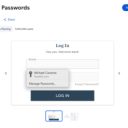
Visit chrome://settings/passwords to ensure no personal passwords remain stored in the local manager.
Visit chrome://settings/autofill to ensure personal credit card details, home addresses, and phone numbers are completely wiped.
Verification on Personal Devices
Open Chrome on your personal computer and go to chrome://settings/. Verify that:
Only your personal profile (@gmail.com) is active.
No corporate managed account appears under "Other profiles" or "Managed by [Company Name]."
5. Local Device Management (Company Computer)
Executing local cleanup ensures no personal files or software traces remain on the machine’s hard drive prior to turning it over to IT.
Software Cleanup
Uninstall Personal Applications: Remove non-work software installed during your employment (e.g., personal messaging apps like WhatsApp/Telegram, gaming clients, personal utility software).
Clear Application Caches: Clear cache and data folders for non-browser applications that may store credentials locally.
File System Purge
Check and clear personal files from the following default directories:
Desktop
Documents
Downloads
Pictures / Music / Movies
Empty Trash / Recycle Bin: Permanently delete all items in the system Trash or Recycle Bin.
Security Note: Basic file deletion does not overwrite hard drive sectors. IT forensic tools can recover deleted files if necessary. Avoid storing highly sensitive personal data on company hardware at any point.
Cloud Storage De-authorization
Sign out of and uninstall all personal cloud desktop applications synced to the device:
Dropbox
OneDrive (Personal)
iCloud for Windows
Personal Google Drive for Desktop
Non-Chrome Browser Cleanup
If you used alternative web browsers (Firefox, Microsoft Edge, Safari, Brave):
Open each browser's settings page.
Sign out of any sync profiles.
Access the history/privacy settings and run a complete purge of All Time browsing history, cookies, cache, autofill data, and saved passwords.
6. Third-Party Services & Connected Cloud Apps
Many web applications use session tokens or saved credentials that persist even if the main browser session is closed.
Disconnect Personal Accounts
Log out of and revoke access to personal credentials across all productivity and developer tools accessed on work hardware:
Application Type
Tools Included
Action Required
Communication
Slack, Discord, WhatsApp Web
Log out of personal workspaces/accounts.
Code / Repositories
GitHub, GitLab, Bitbucket
Remove personal SSH keys and personal logins.
Design / Productivity
Figma, Canva, Notion, Trello
Log out of personal accounts; remove personal emails from workspace invites.
Financial / Utilities
Personal banking, Tax portals, E-commerce
Sign out and clear saved payment methods.
Proactive Password Rotation
As an extra security measure, change the passwords for key personal services if you accessed them from a corporate device or over the corporate VPN:
Physical offboarding ensures that no personal hardware assets are mistakenly returned or lost during IT inventory collection.
Physical Accessories & Media
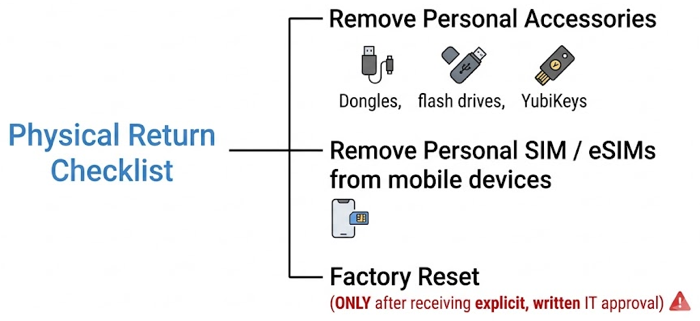
Disconnect all personal peripherals: external hard drives, USB flash drives, wireless mouse/keyboard dongles, hardware security keys, and display adapters.
Inspect media drives (SD card slots, disc drives) for personal media.
Mobile Device Offboarding (Company Phones/Tablets)
Remove Physical SIM Cards: Extract any personal SIM cards inserted into company-issued mobile hardware.
Remove eSIM Profiles: Go to cellular settings and delete personal eSIM profiles.
Sign Out of App Stores: Log out of your personal Apple ID or personal Google Play Store account on company mobile devices. Turn off Find My iPhone or Find My Device.
IT-Approved Factory Resets
Obtain Authorization First:Do not factory reset a computer or mobile device without written authorization or instruction from your IT department. Unapproved wipes can lock devices via activation prevention features (e.g., Apple Device Enrollment Program, Windows Autopilot) or violate corporate audit policies.
Execute Reset (If Approved): Once approved by IT, execute a full system factory reset via system settings to return the device to its original factory state.
8. Post-Departure Monitoring & Verification
After handing over your equipment and leaving the organization, actively monitor your personal security posture to catch any missed connections.
Monitor Account Activity
Run Google Security Checkup: Visit myaccount.google.com/security-checkup on your personal device to review overall account health.
Review Login Logs: Check the recent activity logs of your personal email and critical services for unauthorized access attempts or unfamiliar IP addresses.
Credit & Identity Monitoring: Keep an eye on your personal email and financial statements for suspicious alerts.
Manage Push Notifications and Prompts
Watch for unexpected 2FA prompts or "Is this you trying to sign in?" push notifications on your phone.
If a prompt appears from a former work location or service, tap No, it's not me immediately and update the password for the affected service.