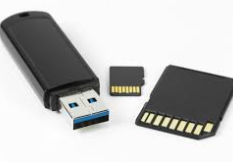
Did you know flash memory has a lifetime?The common lifetime of flash memory is usually measured in program/erase cycles (P/E cycles), also sometimes referred to as write cycles. A single P/E cycle involves erasing the data in a memory block and then writing new data to it. Here's a breakdown: - Consumer-grade flash memory (e.g., in USB drives, SD cards, SSDs for personal use): Typically rated for 300 to 5,000 P/E cycles. Lower-end consumer flash might be closer to the 300 cycle mark, while higher-quality consumer flash may be closer to the 5,000 cycle mark.
- Enterprise-grade flash memory (e.g., in data center SSDs): Designed for much higher endurance and often rated for 10,000 to 100,000+ P/E cycles. Some very high-endurance enterprise SSDs can even exceed 100,000 cycles.
Factors affecting lifetime: - Flash Memory Type: Different types of flash memory (SLC, MLC, TLC, QLC) have different endurance characteristics. SLC (Single-Level Cell) has the highest endurance, followed by MLC (Multi-Level Cell), TLC (Triple-Level Cell), and QLC (Quad-Level Cell). Generally, as you store more bits per cell (moving from SLC to QLC), the endurance decreases.
- Write Amplification: The amount of actual data written to the flash memory can be larger than the data the user intends to write, due to internal operations like garbage collection and wear leveling. This is called write amplification, and it can reduce the lifespan.
- Temperature: Higher temperatures can accelerate wear and tear on flash memory.
- Controller Technology: Advanced controllers use techniques like wear leveling, bad block management, and error correction to extend the lifespan of the flash memory.
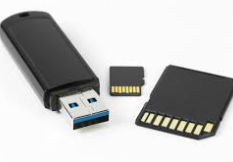
Can I keep it for more than 30 years if I do not use a flash memory?Flash memory has a limited number of write/erase cycles, which degrades over time. If you avoid flash memory and use other storage methods like - Magnetic storage (Hard Disk Drives - HDDs): HDDs can last a very long time if properly stored and not subjected to physical shocks. The data's longevity depends on the quality of the drive and environmental conditions.
- Optical Media (CDs, DVDs, Blu-rays): High-quality, archival-grade discs stored properly (away from heat, humidity, and direct sunlight) can potentially last for decades. However, their longevity is very variable.
- Magnetic Tape: Primarily used for archival purposes, magnetic tape can retain data for many years under controlled environmental conditions.
The key to long-term data preservation is proper storage and periodic refreshing (copying the data to a new medium) to avoid media degradation. However, you must be careful with Hard Disk Drives (HDDs) because they have mechanical parts that can fail over time. What is the safest way to keep Flash Memory?The safest way to keep flash memory (like USB drives, SD cards, and SSDs) involves a combination of physical security, data security, and regular maintenance. Here's a breakdown: 1. Physical Security: - Environmental Control:
- Temperature: Avoid extreme temperatures. Flash memory performs best in a stable, moderate environment.
- Humidity: Keep it dry. Moisture is a major enemy of electronics. Store in a dry, airtight container if you live in a humid environment.
- Dust and Debris: Store in a clean environment. Dust can scratch the surface and get into connectors.
- Protection from Physical Damage:
- Impact and Pressure: Handle flash drives and SD cards carefully. Avoid dropping them or putting them under heavy weight. Consider using protective cases.
- Bending and Twisting: Don't bend or twist USB drives, especially while they are plugged in. This can damage the connectors or the internal components.
- Safe Storage:
- Avoid Static Electricity: Handle flash memory in a static-free environment. Ground yourself before touching them, especially in dry climates.
- Secure Location: Store in a safe place where it won't be lost, stolen, or accidentally damaged.
2. Data Security: - Encryption:
- Full Disk Encryption: Use software to encrypt the entire flash drive or SSD. This protects your data even if the drive is lost or stolen. Popular options include VeraCrypt (free and open-source), BitLocker (Windows Pro editions), and FileVault (macOS).
- Password Protection: If full encryption seems excessive, consider password-protecting specific sensitive files or folders using encryption tools.
- Virus and Malware Protection:
- Scan Regularly: Scan flash drives with a reputable antivirus program before and after connecting them to any computer, especially public computers.
- Write Protection: Some flash drives have a write-protection switch. Enabling this prevents the drive from being written to, thus preventing infection. Use this when you're only using the drive for reading data.
- Secure Erasing:
- Avoid Simply Deleting: When deleting sensitive data, simply deleting it doesn't completely erase it. Use a secure erase tool (like DBAN for full drive erasure or the built-in tools in some SSD management software) to overwrite the data multiple times, making it unrecoverable.
- Access Control:
- Limit Access: Only authorized individuals should have access to the flash drive and its contents.
- Password Management: Use strong, unique passwords and store them securely.
3. Data Backup and Redundancy: - Regular Backups: The most important step for data security! Regularly back up the contents of your flash drive to a separate location, such as:
- Cloud Storage: Services like Google Drive, Dropbox, OneDrive, or specialized backup services offer automatic backup and versioning.
- External Hard Drive: A separate external hard drive is a good option for local backups.
- Another Flash Drive: While not ideal, copying data to another flash drive is better than no backup at all.
- Offsite Backups: Store a backup in a separate physical location (e.g., a safe deposit box, a friend's house) in case of fire, theft, or other disasters.
4. Regular Maintenance: - Safe Removal: Always use the "safely remove hardware" (Windows) or "eject" (macOS) option before physically disconnecting the flash drive. This prevents data corruption by ensuring all write operations are completed.
- Defragmentation (for USB Drives, NOT SSDs): Periodically defragment a USB drive that's used frequently. (SSDs should never be defragmented). Fragmentation can slow down access times and potentially lead to errors. Windows has a built-in defragmentation tool. Don't do this on an SSD.
- Firmware Updates (for SSDs): Check the manufacturer's website for firmware updates for your SSD. These updates can improve performance, reliability, and security.
- Avoid Over-Filling: Don't fill the flash drive to its maximum capacity. Leaving some free space can improve performance and longevity.
- Minimize Write Cycles: Flash memory has a limited number of write cycles. Avoid excessive writing and deleting of data on the drive. If you're primarily reading data, that's ideal.
- Check for Errors: Periodically run a disk check utility (like
chkdsk on Windows or Disk Utility on macOS) to scan for and repair errors on the flash drive.
The safest approach is a multi-layered strategy:1. Protect the physical drive: Handle with care and store it in a safe, stable environment.
2. Secure the data: Encrypt the drive or sensitive files and use a strong antivirus program.
3. Backup regularly: Have multiple backups in different locations.
4. Maintain the drive: Use safe removal practices and periodically check for errors. |