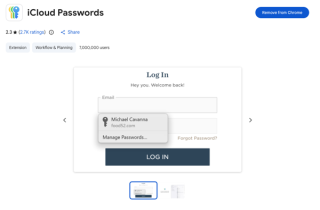
| I found iCloud Password at the Chrome Web Store today, and Apple developed it. That is interesting; that means Apple recognizes Chrome's presence and wants to make a better user experience. Personally I needed to register my passkey to the different key management systems, so sometimes it is annoying me, but it doesn't mean that Apple is better. Anyway, this is one of the good news in person. 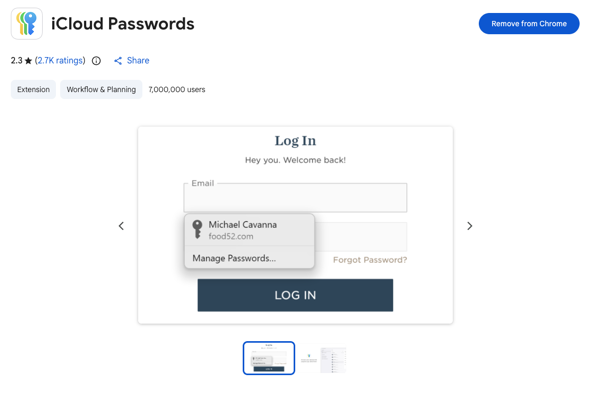
https://chromewebstore.google.com/detail/icloud-passwords/pejdijmoenmkgeppbflobdenhhabjlaj Someone may be able to ask me, “Why are iCloud Passwords useful?”Seamless Cross-Device Synchronization- Universal Access: Allows you to access all your saved Apple Keychain passwords directly within Google Chrome, bridging the gap between Apple's ecosystem and Google's browser.
- Instant Sync Across Devices: Any password created or updated in Chrome on a Mac is immediately synced to your iPhone, iPad, and Apple Watch (and vice-versa).
- Multi-OS Support: If you use an iPhone alongside a Mac or a Windows PC with Chrome, the extension ensures your passwords follow you across different operating systems.
Unified Password Management- Single Source of Truth: Prevents password fragmentation. Instead of maintaining two separate password vaults (Apple Keychain and Google Password Manager), you keep everything consolidated in iCloud.
- Cost Savings: Replaces the need for paid third-party password managers (such as 1Password or Dashlane) if you primarily operate within the Apple ecosystem but prefer Chrome as your desktop browser.
- Privacy and Security: Keeps your sensitive credentials secured by Apple’s end-to-end encryption rather than storing them in Google's cloud services.
Enhanced Security Features- Biometric Authentication: Supports macOS Touch ID to authenticate autofill requests in Chrome, adding a hardware-level layer of security before filling sensitive credentials.
- Built-in 2FA Code Autofill: Automatically generates and populates two-factor authentication (2FA) verification codes saved in iCloud Keychain directly into Chrome web forms.
- Strong Password Generation: Offers Apple’s built-in strong password generator directly within Chrome fields when signing up for new accounts or updating credentials.
Effortless Convenience- Automatic Saving: Automatically prompts to save new logins or updated passwords created in Chrome directly into your iCloud Keychain.
- Zero Copy-Pasting: Eliminates the manual process of opening the System Settings app or an external app to copy and paste passwords into Chrome.
- Credit Card Autofill: Works seamlessly alongside iCloud's payment info features to securely fill payment methods saved in your Apple account.
|